Job Basics
Once an agreement between a provider and a company is active, jobs will be created each time that an order is created
with a delivery method covered by the agreement. Please note that fulfilment agreements tie one of your offerings with
one of the company's delivery methods so agreements can be considered 'per-delivery-method' rather than per company.
The Job Lifecycle
A job is created when an order is created which uses a delivery method that matches a fulfilment agreement.
A job can be updated to dispatched, delivered or cancelled, all of which can represent the end of the lifecycle at this
time (as there may be cases where recorded delivery is not in place).
The Job Object
| Field | Type | Description |
|---|---|---|
| id | integer | The id of the job |
| status | string | The status of the job, either 'pending', 'dispatched', 'delivered' or 'cancelled' |
| company | object | The company object containing id, name, and company_terms_url |
| company.id | integer | The id of the company |
| company.name | string | The name of the company |
| company.company_terms_url | string | The URL to the company terms and conditions |
| delivery_method_name | string | The name of the delivery method |
| delivery_method_description | string | The description of the delivery method |
| option_name | string | The name of the fulfilment option the customer is requesting |
| option_description | string | The description of the fulfilment option |
| order_reference | string | The reference number of the order |
| tracking_reference | string | The tracking reference for the delivery |
| delivery_date | string | The date and time the delivery is scheduled for |
| customer_name | string | The name of the customer |
| customer_email | string | The email address of the customer |
| customer_phone | string | The phone number of the customer |
| delivery_address | object | The delivery address object |
| delivery_address.first_name | string | The first name of the delivery address recipient |
| delivery_address.last_name | string | The last name of the delivery address recipient |
| delivery_address.line1 | string | The first line of the delivery address |
| delivery_address.line2 | string | The second line of the delivery address |
| delivery_address.city | string | The city of the delivery address |
| delivery_address.county | string | The county of the delivery address |
| delivery_address.postcode | string | The postcode of the delivery address |
| vouchers | array | An array of vouchers included in the job |
| tickets | array | An array of tickets included in the job |
| received_at | string | The date and time the job was received |
| dispatched_at | string | The date and time the job was dispatched |
The Voucher Object
| Field | Type | Description |
|---|---|---|
| id | integer | The unique identifier of the voucher |
| name | string | The name of the voucher |
| value | string | The value of the voucher in currency format |
| type | string | The type of voucher (monetary or experience) |
| persons | integer | The number of persons the voucher is for |
| valid_from | string | The date and time the voucher becomes valid |
| valid_until | string | The date and time the voucher expires |
| code | string | The voucher code |
| to | string | The recipient name |
| from | string | The sender name |
| message | string | A personal message for the voucher |
| pdf_copy | string | The URL to download the PDF copy of the voucher |
Get Jobs
Request
GET REQUEST (/fulfilment/jobs?status=pending|dispatched|cancelled)
GET REQUEST (/fulfilment/jobs?after=date|datetime)

Header: Content-Type application/json
Header: Accept application/json
Header: Smart-Auth sk_XXXXXXXXXXXXXXXXXX
Parameters
You can supply a query parameter to filter jobs by their state. States include pending, dispatched, delivered and cancelled.
You may also wish to query jobs for recent changes, you can do this by using the after query parameter, which will return all jobs that have been updated since the time provided so that you can update them in your application.
Response
The response will return a list of jobs matching the request provided.
[
    {
        "id": 1,
        "status": "pending",
        "company": {
            "id": 1,
            "name": "The Conservatory",
            "company_terms_url": null
        },
        "delivery_method_name": "Gift Envelope",
        "delivery_method_description": "Gift envelope (Fulfilled by Courier)",
        "option_name": "Gift Card in a Luxury Envelope",
        "option_description": "Delivered in a decorative, padded envelope",
        "order_reference": "rEJzAQ732r",
        "tracking_reference": null,
        "delivery_date": "2024-11-27 16:10:50",
        "customer_name": "Nicholas Angel",
        "customer_email": "customer@email.com",
        "customer_phone": "01234 567890",
        "delivery_address": {
            "first_name": "John",
            "last_name": "Smith",
            "line1": "Bank Chambers, High Street",
            "line2": "High Street",
            "city": "Newbridge",
            "county": "Newport",
            "postcode": "NP11 4EY"
        },
        "vouchers": [
            {
                "id": 1,
                "name": "Celebration Package",
                "value": "40.00",
                "type": "monetary",
                "persons": 1,
                "valid_from": "2024-11-27 16:10:50",
                "valid_until": "2025-11-27 16:10:50",
                "code": "98198049",
                "to": "John",
                "from": "Jack",
                "message": "Happy Birthday!",
                "pdf_copy": "https://api.smart-gift.co.uk/fulfilment/assets/1/voucher-pdf/78616/1"
            }
        ],
        "tickets": [],
        "received_at": "2024-11-27 16:18:40",
        "dispatched_at": null
    }
]
Update Job
Request
PUT REQUEST (/fulfilment/jobs/{jobId})

Header: Content-Type application/json
Header: Accept application/json
Header: Smart-Auth sk_XXXXXXXXXXXXXXXXXX
Request Body
In the body, you can pass a status and a tracking_reference. The status must be one of dispatched, delivered or cancelled. The tracking_reference is a string that may not exceed 255 characters, this may be for a postage service or your own internal reference, it may also be omitted if you do not wish to use it.
{
    "status": "dispatched",
    "tracking_reference": "TRACKREF#1"
}
Response
The response will return the updated job object.
{
    "id": 1,
    "status": "dispatched",
    "company": {
        "id": 1,
        "name": "The Conservatory",
        "company_terms_url": null
    },
    "delivery_method_name": "Gift Envelope",
    "delivery_method_description": "Gift envelope (Fulfilled by Courier)",
    "option_name": "Gift Card in a Luxury Envelope",
    "option_description": "Delivered in a decorative, padded envelope",
    "order_reference": "rEJzAQ732r",
    "tracking_reference": "TRACKREF#1",
    "delivery_date": "2024-11-27 16:10:50",
    "customer_name": "Nicholas Angel",
    "customer_email": "customer@email.com",
    "customer_phone": "01234 567890",
    "delivery_address": {
        "first_name": "John",
        "last_name": "Smith",
        "line1": "Bank Chambers, High Street",
        "line2": "High Street",
        "city": "Newbridge",
        "county": "Newport",
        "postcode": "NP11 4EY"
    },
    "vouchers": [
        {
            "id": 1,
            "name": "Celebration Package",
            "value": "40.00",
            "type": "monetary",
            "persons": 1,
            "valid_from": "2024-11-27 16:10:50",
            "valid_until": "2025-11-27 16:10:50",
            "code": "98198049",
            "to": "John",
            "from": "Jack",
            "message": "Happy Birthday!",
            "pdf_copy":  "https://api.smart-gift.co.uk/fulfilment/assets/1/voucher-pdf/78616/1"
        }
    ],
    "tickets": [],
    "received_at": "2024-11-27 16:18:40",
    "dispatched_at": "2024-11-27 16:27:37"
}
Download PDF
Request
GET REQUEST (/fulfilment/assets/{jobId}/voucher-pdf/{voucherId}/{headerOption})

Header: Content-Type application/json
Header: Accept application/pdf application/json
Header: Smart-Auth sk_XXXXXXXXXXXXXXXXXX
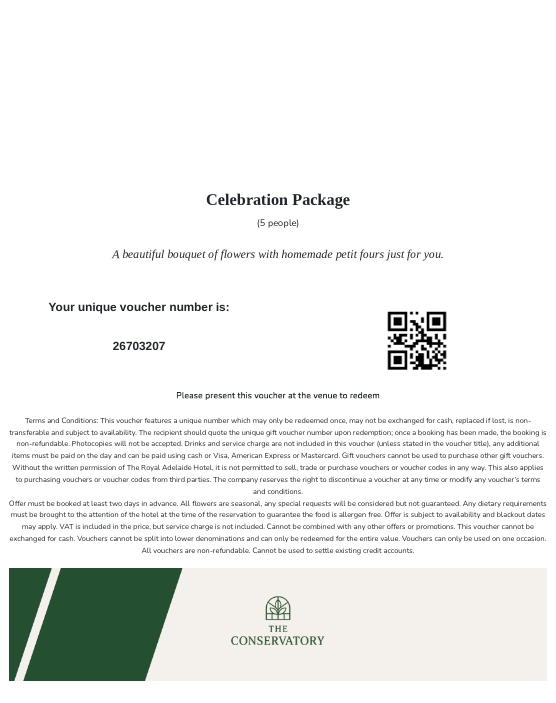
Unlike other endpoints in this API, this one requires application/pdf in the Accept header as you're retrieving the PDF content. You should also add application/json as a secondary type as an error feedback will be formatted as json in line with other error messages in the API. You do not need to generate the URL for this request in your code, if it is available then it will be included in the vouchers object of the get jobs response, just include the authentication headers and make a request to the exact URL.
PDF Headers
The header option determines whether you are requesting the vouchers with headers and footers, just footers, or with neither.
When you set up your fulfilment options with us, we'll ask about your PDF requirements so that assets are generated along
with each job.
You do not need to change any of the options in this request. The assets are generated within 300 seconds of the order
being processed, you will need to send a get request to the URL provided with your authentication in the header as normal,
we will return the PDF for you to stream to your application for viewing or printing. Changing the header option will
not initiate or affect the PDF generation process, it will likely just lead to an error response.
If you are an existing provider that requires PDFs for one of your fulfilment options, please get in touch.
Response
The response will return PDF asset if it exists or an error if it does not.
Error Responses
Error responses related to Fulfilment Jobs are typically a result of an invalid filter value being passed in with the API request, however they may also be returned due to invalid configurations or if an unexpected error occurs. Please review Error Responses for guidance on dealing with errors.